
In this post we walk through installing SQL Server 2025 Public Preview with Docker on a MacBook, generating text embeddings with an Ollama model, and using those embeddings inside SQL Server for semantic search. The whole thing is designed to run locally.
Prerequisites
- macOS (Apple Silicon M1/M2 recommended)
- Docker Desktop
- Python 3.11+
- Ollama (with the nomic-embed-text model)
- Microsoft ODBC Driver 18 for SQL Server
- The pyodbc, requests and numpy Python libraries
1. Installing SQL Server 2025 with Docker
The commands below start the SQL Server 2025 Public Preview container.
docker pull mcr.microsoft.com/mssql/server:2025-latest

docker run -e 'ACCEPT_EULA=Y' \
  -e 'MSSQL_SA_PASSWORD=YourStrongPassword1!' \
  -p 1433:1433 \
  --name sql2025 \
  -d mcr.microsoft.com/mssql/server:2025-latest

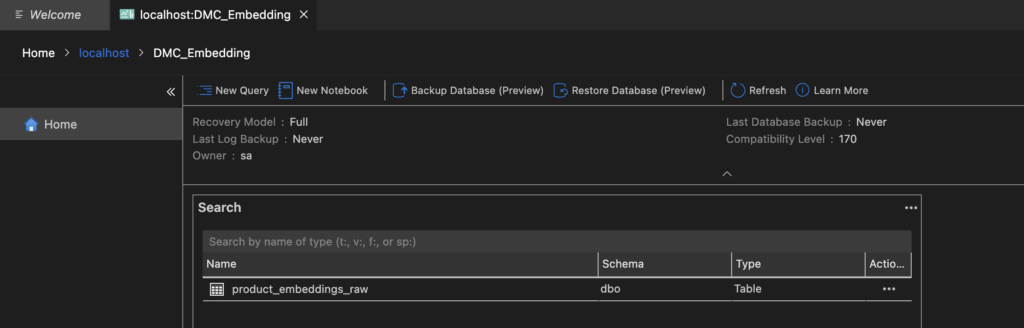
2. Creating the database and the table
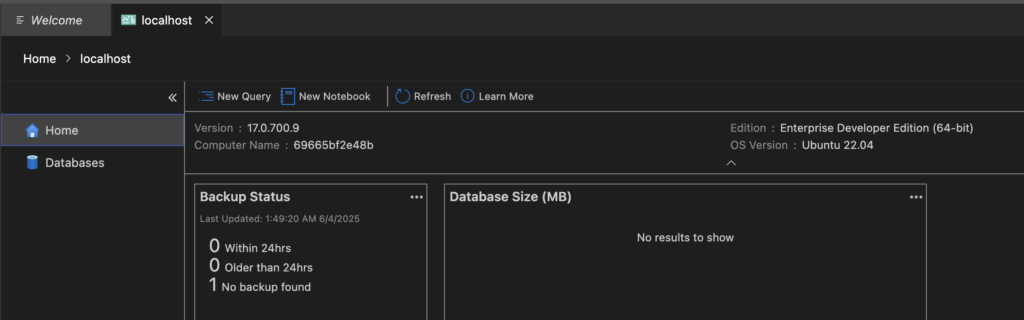
Connect with Azure Data Studio and run the statements below.
CREATE DATABASE DMC_Embedding;
GO
USE DMC_Embedding;
GO
CREATE TABLE product_embeddings_raw (
  id INT PRIMARY KEY,
  product_name NVARCHAR(255),
  embedding NVARCHAR(MAX)
);
3. Installing Ollama and running the model
brew install ollama
ollama run nomic-embed-text

Once the model starts, the Ollama server listens on port 11434.

4. Generating embeddings and writing them to SQL (ollama2sql.py)
The Python script below generates the embeddings and saves them to SQL Server.
import requests
import pyodbc

def get_embedding(prompt):
    res = requests.post("http://localhost:11434/api/embeddings", json={
        "model": "nomic-embed-text",
        "prompt": prompt
    })
    return res.json()["embedding"]

conn = pyodbc.connect("DRIVER={ODBC Driver 18 for SQL Server};SERVER=localhost,1433;DATABASE=DMC_Embedding;UID=sa;PWD=YourStrongPassword1!;TrustServerCertificate=yes")
cursor = conn.cursor()

def insert_raw_embedding(product_id, product_name, vector):
    import json
    json_vector = json.dumps(vector)
    query = "INSERT INTO product_embeddings_raw (id, product_name, embedding_text) VALUES (?, ?, ?)"
    cursor.execute(query, (product_id, product_name, json_vector))
    conn.commit()
    print("✅ Embedding yazıldı.")

# Kullanım
prompt = "SQL Server 2025 semantic search destekliyor mu?"
vector = get_embedding(prompt)
insert_raw_embedding(999, prompt, vector)
Running ollama2sql.py writes the embeddings.

5. Semantic search with semantic.py
The query typed by the user is turned into an embedding and compared against every record with cosine similarity.
import requests
import pyodbc
import json
import numpy as np

def get_embedding(prompt):
    res = requests.post("http://localhost:11434/api/embeddings", json={
        "model": "nomic-embed-text",
        "prompt": prompt
    })
    return np.array(res.json()["embedding"])

def cosine_similarity(v1, v2):
    return float(np.dot(v1, v2) / (np.linalg.norm(v1) * np.linalg.norm(v2)))

conn = pyodbc.connect("DRIVER={ODBC Driver 18 for SQL Server};SERVER=localhost,1433;DATABASE=DMC_Embedding;UID=sa;PWD=YourStrongPassword1!;TrustServerCertificate=yes")
cursor = conn.cursor()

prompt = "SQL Server'da benzer cümleleri nasıl bulurum?"
new_vector = get_embedding(prompt)

cursor.execute("SELECT id, product_name, embedding_text FROM product_embeddings_raw")
rows = cursor.fetchall()

best_match = None
best_score = -1

for row in rows:
    existing_vector = np.array(json.loads(row.embedding_text))
    score = cosine_similarity(new_vector, existing_vector)
    if score > best_score:
        best_score = score
        best_match = row

print(f"? ID: {best_match.id}, Name: {best_match.product_name}, Similarity: {best_score:.4f}")

Result
With this setup we performed meaning based text comparison successfully, even though SQL Server 2025 does not yet support the VECTOR data type.We generated the embeddings outside the database through the Ollama model and stored the results in JSON format.The similarity itself was calculated on the Python side with the cosine similarity algorithm, which completed the semantic search scenario.
Change the prompt inside semantic.py and run the script again, and the difference in the similarity scores becomes obvious.That makes it a useful exercise, because it shows how semantic search works at the level of meaning rather than at the level of matching characters.

Appendix: why did we use Python?
In SQL Server 2025 Public Preview the 'AI_RUNTIME' component is disabled in the Docker images. That means functions such as `AI_GENERATE_EMBEDDINGS` cannot be called inside the database. To generate embeddings you have to do the work outside SQL Server, with a tool such as Python.
Python was chosen for these reasons:
- It calls Ollama over HTTP without any friction
- It can write the JSON embedding vector into SQL Server
- Cosine similarity is straightforward to calculate with NumPy
- Everything happening outside SQL Server can be scripted
Appendix: what would change on Kubernetes with Azure Arc SQL Server?
In a SQL Server instance running on Kubernetes through Azure Arc, the embedding process changes depending on the configuration.
1. If the Arc enabled SQL Server instance has 'AI_RUNTIME=ON' and a model endpoint can be defined, the embedding can be produced inside SQL. For example;
SELECT AI_GENERATE_EMBEDDINGS('nomic-embed-text', 'Does SQL Server support embeddings?');
In that case Python and other external tools are not needed.
2. If AI support is off, or the model in use sits outside Azure the way Ollama does, the embeddings still have to be produced externally, with Python for instance, and loaded into SQL Server by hand.
To summarise:
- Arc SQL Server with AI support: Python optional
- Arc SQL Server without AI support: Python required
- When official endpoints such as Azure OpenAI are defined, embeddings can be generated entirely from inside SQL.
Appendix: how does this scenario work on Azure SQL?
If you want to run this on Azure SQL rather than a local SQL Server 2025, whether you need Python again depends on what the environment can do:
- Azure SQL Database (PaaS): no AI_RUNTIME or AI_MODEL support. Python or another external service is needed to generate embeddings.
- Azure SQL Managed Instance (MI): AI support is not active yet. Python is still required.
- Azure Arc SQL Server (AI_RUNTIME=ON): if the model can be defined as an HTTP endpoint, the need for Python goes away.
- Azure OpenAI + Azure Function + Azure SQL: embeddings can be generated by an external service and the result loaded into the database.
So for now (as of June 2025) generating embeddings directly inside Azure SQL is not possible. Python is still needed for embedding generation and similarity calculation. Microsoft is expected to enable AI_RUNTIME support in later releases, on both Azure SQL MI and SQL Server 2025 RTM.
Note: this content was prepared against SQL Server 2025 Public Preview as of June 2025. Features such as AI_RUNTIME and AI_MODEL are not active in that release. Embedding work therefore happens outside SQL Server, through Ollama and Python.
Further note: these features are expected to be supported directly in the RTM release of SQL Server 2025. This document is therefore shared as a workaround under current Preview conditions.